Bookmark this. It's everything about screen recording on iPhone on one page, without the step-by-step padding.
The gestures
| Action | How |
|---|---|
| Open Control Center | Swipe down from the top-right corner (iPhone SE: swipe up from the bottom) |
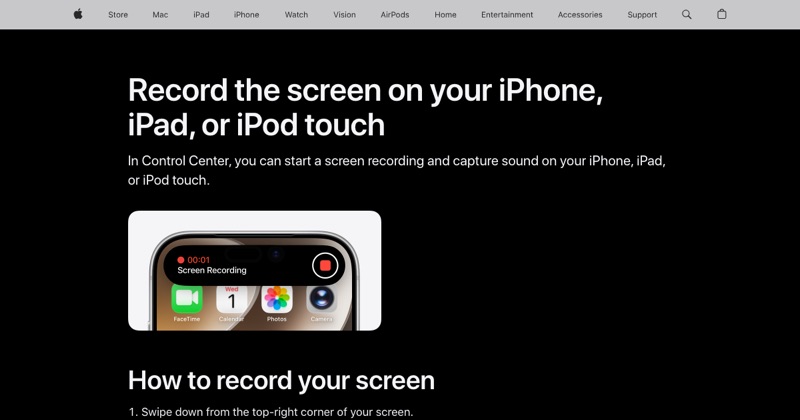
| Start recording | Tap the Screen Recording button, wait 3 seconds |
| Start with your voice | Touch and hold the button, turn on Microphone, tap Start Recording |
| Stop recording | Tap the red indicator at the top, then Stop |
| Find the video | Photos app, Library |
Add the button (one time)
- iOS 18 and later: Control Center + > Add a Control > Screen Recording.
- iOS 17 and earlier: Settings > Control Center, tap + next to Screen Recording.
Settings to change before you record
- Do Not Disturb or a Focus: stops notification banners appearing in your video.
- Auto-Lock: set Settings > Display & Brightness > Auto-Lock longer if you'll pause while recording, so the screen doesn't dim.
- Brightness: recordings capture what's on screen, not your brightness level, but a bright screen makes it easier for you to see what you're doing.
- Storage: keep a few GB free for anything longer than a couple of minutes.
What it can and can't capture
| Captures | Doesn't capture |
|---|---|
| Everything on screen | Phone and video call audio |
| App and game sound | Protected streaming video (records black) |
| Your voice (if mic is on) | Content while AirPlay mirroring |
| Notifications that appear | Just one part of the screen |
Quick fixes
- Button missing: add it (see above).
- Button gray: Settings > Screen Time > Content & Privacy Restrictions > Content Restrictions > Screen Recording > Allow.
- No sound: turn the mic on, check Silent mode, and remember calls are never recorded.
- Stopped early: free up storage.
Need more detail on any of these? See the full iPhone screen recording guide.
Where MobileStudio fits
For recordings of your own app, MobileStudio turns the raw clip into a polished demo with a device frame and zooms, all on your phone. Get MobileStudio.
Quick FAQ
Is there a keyboard shortcut for iPhone screen recording?
No, but on iPhones with an Action button you can assign Screen Recording to it on iOS 18 and later.
Can I pause a recording?
No. Stop it and start a new one, then trim.