If you've never screen recorded on an iPhone, the first attempt can feel confusing: where's the button, did it start, is it recording right now? This guide answers those questions in the order you'll have them.
What the Screen Recording button looks like
Swipe down from the top-right corner of your screen to open Control Center. The Screen Recording button is a white circle inside a ring, a bit like a target. On iPhone SE, swipe up from the bottom of the screen instead.
Don't see it? It's not on every iPhone by default. Tap the + at the top-left of Control Center, choose Add a Control, and search for "Screen Recording".
What happens when you tap it
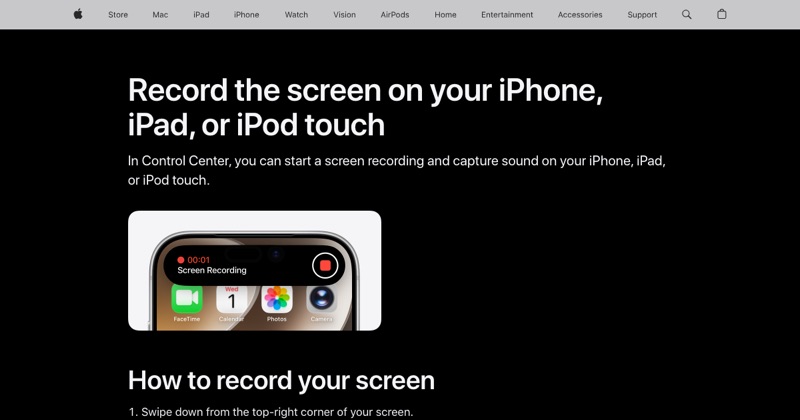
Tap the button once. You'll see a 3, 2, 1 countdown on the button. That's your time to swipe Control Center away. When the countdown ends, the button turns red and recording has started.
Nothing on screen looks different, apart from a small red indicator at the top of the screen, around the clock or the Dynamic Island. That red mark is how you know it's recording.
What gets recorded
- Everything on screen, including notifications that pop up.
- Sound from apps like videos, games, and music (most apps, anyway).
- Not your voice, unless you turn the microphone on. To do that, touch and hold the record button instead of tapping it, tap Microphone, then Start Recording.
How to stop
Tap the red indicator at the top of the screen and tap Stop. A small notice says the video was saved to Photos. That's where you'll find it.
Common first-time surprises
- "It recorded me closing Control Center." Everyone's does. Trim the start in Photos with Edit.
- "There's no sound from my call." That's on purpose. Phone and video call audio isn't captured. See how to record a FaceTime call.
- "The button is gray." A Screen Time restriction is on. Check Settings > Screen Time > Content & Privacy Restrictions.
Where MobileStudio fits
Once you're comfortable recording, the next step is making the video look good. MobileStudio frames iPhone screen recordings in a device mockup and exports them ready to share. Get MobileStudio.
Quick FAQ
How do I know my iPhone is screen recording?
A red indicator appears at the top of the screen for as long as the recording runs.
Is there a time limit?
Apple doesn't publish one. Storage and battery are the practical limits.
Does it record my voice?
Only if you turn the microphone on before you start.