The iPhone's screen recorder is simple, but what it captures surprises people, sometimes embarrassingly. Here's exactly what goes into the video before you share it.
How to start an iPhone screen recording
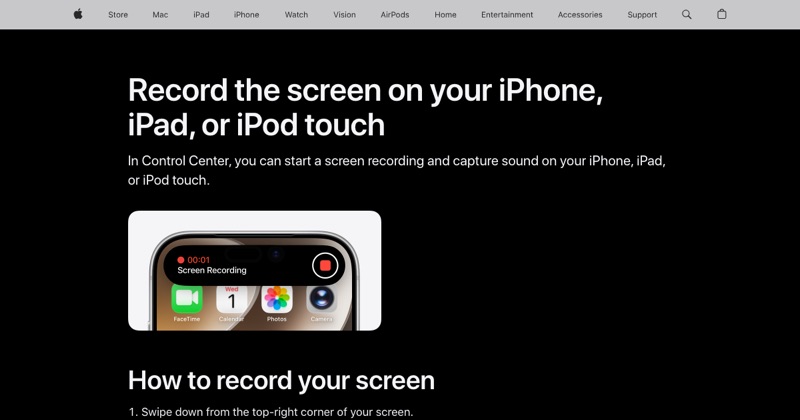
Swipe down from the top-right corner, tap the Screen Recording button, and wait three seconds. Tap the red indicator at the top to stop. The video saves to Photos.
What it captures
Everything visible on screen. Every app, every swipe, every keyboard tap, and everything that pops up.
Notifications. If a message arrives mid-recording, its preview is in your video. Turn on Do Not Disturb first.
App and game sound. Most apps' audio is recorded by default.
Your microphone, if you turn it on. Touch and hold the record button to switch it on before you start.
What you type. The keyboard, and the keys lighting up as you tap, are visible. If you type a password while recording, assume someone watching could work it out.
What it doesn't capture
Phone and video call audio. iPhone deliberately leaves out the other side of calls, including FaceTime. Here's what does work for FaceTime.
Protected video. Netflix and other streaming apps record as black. Some banking apps hide their screens too.
Anything while screen mirroring. You can't record and AirPlay mirror at once.
Touches. iPhone doesn't show where you tapped. If you need visible touches for a tutorial, you'll have to add them later or describe them.
Before you share a recording, check
- Any notification previews with private messages.
- Your email address, phone number, or account details on screen.
- Other people's names or photos.
- Battery and time in the status bar, if those matter to you. Crop them out in Photos.
Where MobileStudio fits
For app makers, a raw recording also captures the messy parts: the status bar, a cluttered home screen, the reach for the stop button. MobileStudio frames and polishes the recording into a clean app demo on your phone. Get MobileStudio.
Quick FAQ
Does iPhone screen recording show notifications?
Yes. Turn on Do Not Disturb before you record.
Can people tell I'm screen recording?
iOS doesn't notify anyone. Some apps can detect it and hide content.